An S-curve is a chart of a project’s cumulative progress week by week. The planned line usually rises slowly at first, fast in the middle and flattens at the end, so it looks like the letter S. Drawing the actual line on the same chart shows delays at a glance.
What you need
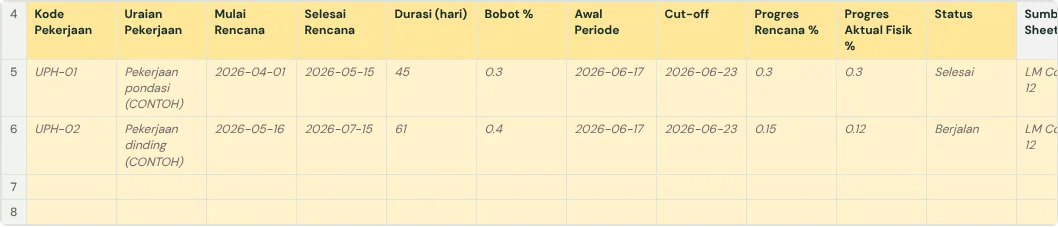
- The work items from the budget (RAB) with their weights (item amount ÷ total budget).
- Each item’s planned start and finish dates.
- Actual progress from the site measurement (opname) every week.
How to build the S-curve, step by step
- Work out each item’s weight from the budget; all weights must add up to 100%.
- Spread each item’s weight evenly over the weeks it runs. An item weighted 6% that takes 3 weeks adds 2% a week.
- Add up all items for each week, then add the weeks up cumulatively. That is the planned line.
- Every week, work out actual progress: each item’s progress × its weight, added up.
- Draw both lines on one line chart. The gap between them is the schedule deviation.
When delay counts as critical
On Indonesian government contracts, the PUPR critical-contract procedure uses the deviation from the S-curve: while planned progress is 0% to 70%, a contract is critical when actual is more than 10% behind; while planned is 70% to 100%, when it is more than 5% behind. A critical contract goes through staged show cause meetings, then warning letters, and can end in termination. Private projects can use the same limits as a warning sign.
Keep the original planned S-curve as the baseline. If the schedule is formally revised by an addendum, draw the new curve but keep showing the old one.
Reading the S-curve
When the actual line is below the planned line, the project is behind. If week 8 is planned at 45% and actual is 40%, the deviation is minus 5%. Look for heavily weighted items whose progress is lagging; that is where delay matters most.
The full guide is in How to create a weekly construction schedule report in Google Sheets. It has a free template (Excel or Google Sheets) and a checker that reads your own workbook.
Ready to use the Komander agents on your projects?
When your workbook is complete, apply for a pilot: we help connect your project data to the Finance, Cost and Scheduler agents and review the first reports with you.
Send to melwani@komander.ai. Your workbook check result is included when there is one; the workbook itself is not sent.
Common questions
What is an S-curve in construction?
A chart of the project’s cumulative progress over time. The planned line is compared with the actual line to see whether the project is on schedule.
Why is it called an S-curve?
Progress is usually slow at the start (preparation), fast in the middle (structure and walls) and slow again at the end (finishes), so the line forms an S.
Where do the S-curve weights come from?
From the budget: each work item’s weight is its amount divided by the total budget.
Do I have to draw the S-curve by hand?
No. When every work item has a weight and planned start and finish dates, the S-curve can be calculated automatically from that data.
References
- BBWS Serayu Opak (PUPR): SOP Kontrak Kritis (Indonesian): deviation limits and show cause meeting stages
- Procore: Guide to S-Curve Modeling in Construction: baseline discipline and data quality