A BOQ (bill of quantities) lists the work items and their quantities. A RAB (budget) is the BOQ with unit prices added. So the order never changes: read the drawings and specifications, list the work, work out the quantity of each item, then price it.
Drawings and specifications: what comes from each
| Document | What you take from it | Example |
|---|---|---|
| Floor plan | Wall lengths, room areas, door and window positions | A 6 × 8 m house with one inner wall |
| Elevations and sections | Wall heights, floor levels, roof pitch | Walls 3 m high |
| Details | Foundation, ground beam, column and beam sizes, rebar | Stone foundation 0.3 m top, 0.6 m bottom |
| Door and window schedule | Number and size of doors and windows | P1 0.9 × 2.1 m; J1 1.2 × 1.2 m |
| Technical specification (RKS) | Grades, brands, material types, workmanship | Concrete fc 20 MPa, 60 × 60 tiles, exterior wall paint |
| The client’s BOQ, if any | The order and item names to follow | A tender pricing format |
Drawings set the quantities. Specifications set the item description and its unit price: the same wall is priced differently in clay brick or lightweight block. When drawings and specifications disagree, note it and ask before you measure.
Step 1: list the work
Follow the order of construction and give every section and item a code. The same codes are used later in the schedule and the cost report.
- I Preliminaries: site clearing, setting out, site office, mobilisation.
- II Earthworks and foundations: excavation, sand bed, foundation, backfill.
- III Concrete: ground beams, columns, beams, slabs.
- IV Walls: blockwork, plaster, skim.
- V Roof and ceiling.
- VI Floors: fill, blinding, tiles.
- VII Frames, doors, windows.
- VIII Electrical and plumbing.
- IX Painting and finishing.
Check the specification for work you cannot see on the drawings, such as termite treatment, bathroom waterproofing or final cleaning.
Step 2: take quantities off the drawings
A single-storey 6 × 8 m house with one inner wall. All dimensions are taken on the wall centre lines (axes).
| Work item | From the drawing | Calculation | Quantity |
|---|---|---|---|
| Wall and foundation axis length | Plan: 6 × 8 m outline, one 6 m inner wall | 2 × (6 + 8) + 6 | 34 m |
| Foundation excavation | Section: 0.7 m wide, 0.8 m deep | 0.7 × 0.8 × 34 | 19.04 m3 |
| Stone foundation | Detail: 0.3 m top, 0.6 m bottom, 0.7 m high | (0.3 + 0.6) ÷ 2 × 0.7 × 34 | 10.71 m3 |
| Concrete ground beam 15/20 | Beam detail 0.15 × 0.20 m | 0.15 × 0.20 × 34 | 1.02 m3 |
| Lightweight block walls | Wall height 3 m from the section | 34 × 3 = 102, minus openings 7.89 | 94.11 m2 |
| Plaster and skim | Both faces of the walls | 94.11 × 2 | 188.22 m2 |
| Floor tiles 60 × 60 | Inside floor area | 5.85 × 7.85, minus the inner wall 0.88 | 45.04 m2 |
| Doors and windows | Door and window schedule: 2 doors, 3 windows | counted per piece | 2 doors, 3 windows |
Openings: front door 0.9 × 2.1 = 1.89 m2, inner door 0.8 × 2.1 = 1.68 m2, three windows 1.2 × 1.2 = 4.32 m2. Together 7.89 m2, taken off the wall area.
Units to use
| Kind of work | Unit | How it is measured |
|---|---|---|
| Excavation, fill, concrete, foundations | m3 | length × width × height |
| Reinforcement | kg | bar length × weight per metre |
| Formwork, walls, plaster, paint, tiles, roofing | m2 | length × height or length × width |
| Trims, gutters, pipes, frames | m | length |
| Doors, windows, toilets, lights | unit or piece | counted |
| Electrical and water points | point | counted from the services drawings |
| Preliminaries and mobilisation | ls (lump sum) | one package |
Step 3: make a quantity take-off sheet
Do not type quantities straight into the BOQ. Keep a take-off sheet in Excel with one row per measured part, so every figure can be checked again.
| Item | Location / axis | Length | Width / height | Count | Quantity |
|---|---|---|---|---|---|
| Wall | Axes A and C (6 m) | 6 | 3 | 2 | 36 |
| Wall | Axes 1 and 3 (8 m) | 8 | 3 | 2 | 48 |
| Wall | Axis B, inner wall | 6 | 3 | 1 | 18 |
| Door opening P1 | Axis A | 0.9 | 2.1 | -1 | -1.89 |
| Door opening P2 | Axis B | 0.8 | 2.1 | -1 | -1.68 |
| Window openings J1 | Axes A, 1, 3 | 1.2 | 1.2 | -3 | -4.32 |
| Wall total | 94.11 m2 |
The formula: Quantity = Length × Width or Height × Count. Openings get a negative count, so the total is already net. That total is linked into the BOQ with a formula, not typed again.
Step 4: from BOQ to budget
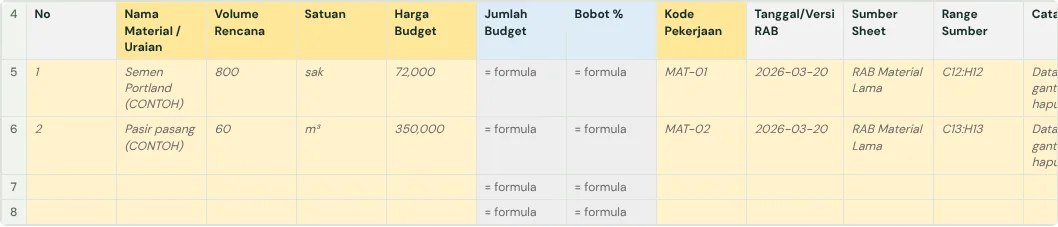
- Carry each quantity total into the BOQ: code, description (as specified), unit, quantity.
- Fill in unit prices from the unit price analysis (AHSP) or current market prices for that specification.
- Amount = quantity × unit price, as a formula.
- Add the summary: total per section, overhead and profit if not in the unit prices, VAT, grand total.
- Work out each item’s weight from its amount for the schedule and S-curve.
Material waste belongs in the AHSP coefficients, not in the BOQ quantities. Adding it in both places counts it twice.
How to check the BOQ and budget
- Compare the cost per m2 of building with similar projects. A figure far off points at a quantity or price to check.
- Match related items: plaster area is about twice the wall area; paint area equals plaster area plus ceilings.
- Make sure every item in the specification is in the BOQ, and every BOQ item has a basis in the drawings or specification.
- Ask a second person to recalculate a few of the largest items from the take-off sheet.
Common mistakes
- Measuring foundation length on the outside face of walls, so corners are counted twice. Use the wall axes.
- Forgetting to take door and window openings off wall, plaster and paint areas.
- Typing quantities with no take-off sheet, so nothing can be checked when the drawings change.
- Descriptions that do not follow the specification, such as just "wall" with no block type or thickness.
- Waste added to the quantity and to the coefficient as well.
The full guide is in How to build a construction cost report that catches overruns early. It has a free template (Excel or Google Sheets) and a checker that reads your own workbook.
Ready to use the Komander agents on your projects?
When your workbook is complete, apply for a pilot: we help connect your project data to the Finance, Cost and Scheduler agents and review the first reports with you.
Send to melwani@komander.ai. Your workbook check result is included when there is one; the workbook itself is not sent.
Common questions
What is the difference between a BOQ and a RAB?
A BOQ lists the work and its quantities. A RAB is the BOQ with unit prices and amounts added.
Where do BOQ quantities come from?
From the construction drawings: plans, elevations, sections and details. The specification sets the type and grade of the work.
Why measure on the wall axes?
So corners where walls meet are not counted twice, and the result matches the drawings.
Does waste go into the quantity?
No. BOQ quantities are net quantities from the drawings; waste is already in the unit price analysis coefficients.
References
- Permen PUPR No. 8 of 2023 (JDIH PUPR, Indonesian): quantities and unit prices for government work