A RAB (Rencana Anggaran Biaya, the construction budget) lists every work item in a project, how much of it there is and what it costs. It is the basis for the contract, the schedule and cost control: without a tidy budget, actual costs cannot be compared with anything.
The columns a budget needs
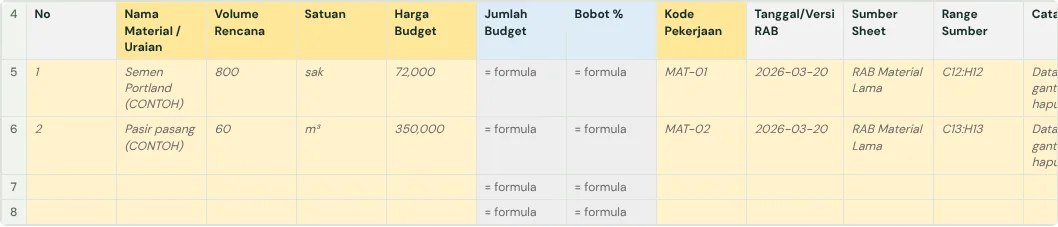
| Column | What it holds | Example |
|---|---|---|
| Work code | A unique code per item, grouped by section | II.1 |
| Description | A clear name for the work | Stone foundation |
| Unit | The unit of measure | m3 |
| Quantity | How much work, as a number | 12.5 |
| Unit price | Price per unit; may be split into material and labour | 450,000 |
| Amount | Quantity × unit price (formula) | 5,625,000 |
| Weight % | Amount ÷ total budget (formula) | 2.3% |
How to build the budget, step by step
- Split the project into sections: preparation, foundations, structure, walls, roof, finishes, installations.
- In each section, write one work item per row with a work code (I.1, I.2, II.1 and so on).
- Take quantities from the drawings and put the unit in its own column (not "12 m3" in one cell).
- Fill unit prices from your unit price analysis (AHSP) or current market prices.
- Let the amount and weight be calculated by formulas, so totals stay right when a quantity or price changes.
The budget summary (rekapitulasi)
A RAB ends with a summary: the total of each section, then the additions on top up to the contract total.
| Row | Contents |
|---|---|
| I to X | Total of each section of work |
| Direct cost total | All sections added up |
| Overhead and profit | Only if not already in the unit prices |
| Safety cost (SMKK) | Required on government work |
| Total before tax | The rows above added up |
| VAT (PPN) | At the current rate |
| Total | The tendered or contract value |
| Rounded | Usually to the nearest thousand |
Remember the preliminaries that are often missed, such as mobilisation, site office, site water and power, and a contingency on private projects. Add a cover sheet too: project name, location, date, and the month the prices are from.

Common mistakes
- Quantities or prices typed as text ("12.5 m3"), so they cannot be calculated.
- No work codes, so actual costs cannot be matched to budget items.
- Section totals typed by hand instead of formulas, so they do not change when an item does.
- Material and labour mixed on some rows but split on others.
A unit price that combines material and labour can still be used. Split them only if you want to compare material and labour each against actual costs.
The full guide is in How to build a construction cost report that catches overruns early. It has a free template (Excel or Google Sheets) and a checker that reads your own workbook.
Ready to use the Komander agents on your projects?
When your workbook is complete, apply for a pilot: we help connect your project data to the Finance, Cost and Scheduler agents and review the first reports with you.
Send to melwani@komander.ai. Your workbook check result is included when there is one; the workbook itself is not sent.
Common questions
What is a RAB?
RAB stands for Rencana Anggaran Biaya, the construction budget: the project’s work items with quantity, unit price and amount. It is the basis for the contract and for cost control.
What is the difference between a RAB and a BOQ?
A BOQ (Bill of Quantities) lists the work items and their quantities. A RAB adds unit prices and amounts, which makes it a budget.
How do I calculate the weight of a work item?
Weight is the item’s amount divided by the total budget. It is used to work out physical progress and to draw the S-curve.
Is there a free Excel budget template?
Yes. The template in the cost report guide downloads as Excel or opens directly in Google Sheets, with formulas for amounts and weights.
References
- Permen PUPR No. 8 of 2023 (JDIH PUPR, Indonesian): budget and owner estimate layout for government work
- Projul: Free construction budget templates: overhead, contingency and profit lines