A gantt chart is a schedule drawn as bars: one row per work item, each bar showing when that work starts and finishes. At a glance everyone on the project sees what is under way, what comes next, and what is late. In Indonesia it is also called a bar chart or time schedule.
The data you need
| Column | What it holds | Example |
|---|---|---|
| Work item code | The same code as the budget (RAB) | II.1 |
| Work item | Name of the work | Stone foundation |
| Planned start | Start date | 09/03/2026 |
| Planned finish | Finish date | 29/03/2026 |
| Duration | Finish minus start plus 1, in days | 21 days |
| Predecessor | Work that must finish first | I.1 Preparation |
| Actual progress % | From the latest site measurement | 60% |
How to make a gantt chart in Excel or Google Sheets
- Build the table above, one row per work item, sorted by start date.
- To the right of the table, add one column per week. In the header row, write the first date of each week (for example Monday), starting from the project’s first week.
- Select all the week cells, open Conditional Formatting and choose "use a formula".
- Enter a formula that colours a cell when that week falls between start and finish. With start in column C, finish in column D, week dates in row 4 from column H and data from row 5: =AND(H$4+6>=$C5, H$4<=$D5). Whether the separator is a comma or a semicolon depends on your computer’s regional settings. The week header cells must hold real dates, not text.
- Choose a fill colour, for example light blue, for the planned bars.
- Add a second rule in a darker colour for the part already done: =AND($G5>0, H$4+6>=$C5, H$4<=$C5+($D5-$C5)*$G5) when actual progress is in column G.
- Add a third rule that colours the current week’s column, for example light red: =AND(TODAY()>=H$4, TODAY()<=H$4+6).
In Google Sheets the top rule wins and new rules go to the bottom. Drag the progress rule (dark fill) above the plan rule so the dark fill shows. Holidays and non-working days can get a grey fill with a rule of their own.
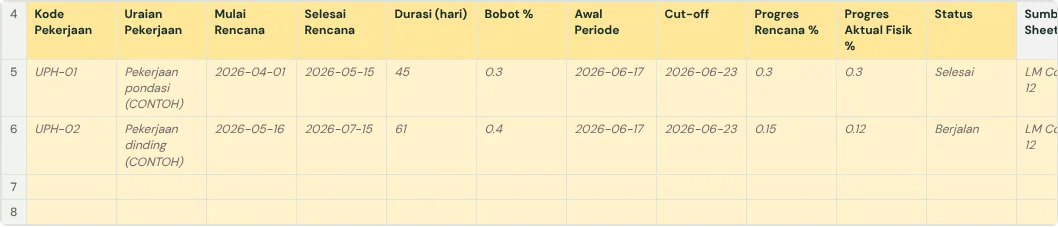
How to read a gantt chart
- The today line: every bar left of it should be finished, and bars it crosses are under way.
- The dark fill inside a bar is actual progress. If the dark fill stops before the today line, that work is behind plan.
- A bar that starts when another finishes shows the order of work. If the earlier one is late, the next one moves too.
- Long bars running at the same time show busy weeks: more crew, materials and supervision needed.
- When the schedule is formally revised (an addendum), keep the original plan bars as a baseline next to the new schedule, so delay does not disappear.
Gantt chart and S-curve
Both come from the same schedule. A gantt chart answers "which work is late", an S-curve answers "how far behind is the whole project". A good weekly report uses both: the S-curve for the big picture, the gantt chart to point at the work that needs catching up.
Common mistakes
- Bars drawn by hand, colouring cells one by one, so they do not move when dates change.
- No actual progress, so the chart only shows the plan and delay never shows.
- Work item codes that differ from the budget, so the schedule cannot be linked to cost and weight.
- Too much detail: hundreds of small rows. For reporting, the main work items are enough; keep the detail in the schedule table.
The full guide is in How to create a weekly construction schedule report in Google Sheets. It has a free template (Excel or Google Sheets) and a checker that reads your own workbook.
Ready to use the Komander agents on your projects?
When your workbook is complete, apply for a pilot: we help connect your project data to the Finance, Cost and Scheduler agents and review the first reports with you.
Send to melwani@komander.ai. Your workbook check result is included when there is one; the workbook itself is not sent.
Common questions
What is a project gantt chart?
A schedule drawn as bars: one row per work item, each bar running from its start date to its finish date.
How do I make a gantt chart in Excel without add-ons?
Make a table of work items with start and finish dates, add one column per week beside it, then colour the cells with Conditional Formatting using =AND(week+6>=start, week<=finish).
What is the difference between a gantt chart and an S-curve?
A gantt chart shows the schedule of each work item; an S-curve shows the cumulative progress of the whole project. Both come from the same schedule data.
How do I see late work on a gantt chart?
Look at the today line. If the actual progress (dark fill) stops before it, that work is behind plan.
References
- Exceljet: Gantt chart: the conditional formatting formula
- Microsoft Tech Community: Gantt chart date formula: weekly columns and tasks starting mid-week
- Google: Apply conditional formatting rules: custom formulas in Google Sheets