The cut-off date is a report’s closing date: all costs, progress and transactions up to that date go into the report, and anything after it goes into the next period. A cut-off makes numbers comparable, because cost and progress are counted up to the same day.
Why the cut-off matters
Say costs are recorded up to 30 June but progress was last measured on 23 June. A week of extra cost is in, the matching progress is not, so the project looks over budget when it is not. If progress is newer than the costs, it looks under budget. With one cut-off for cost and progress, the comparison is honest.
Example with a 23 June 2026 cut-off
| Transaction | Date | In this report? |
|---|---|---|
| Receipt for 40 bags of cement | 20/06/2026 | Yes |
| Site measurement, ground floor walls | 23/06/2026 | Yes, on the cut-off date |
| Crew advance | 24/06/2026 | No, next period |
| Rebar supplier bill (delivered 22/06, bill arrived 26/06) | 22/06/2026 | Yes, by delivery date, not the date the bill arrived |
How to enter the cut-off date
- Pick a fixed cut-off day, for example every Tuesday or the end of the month, and keep it.
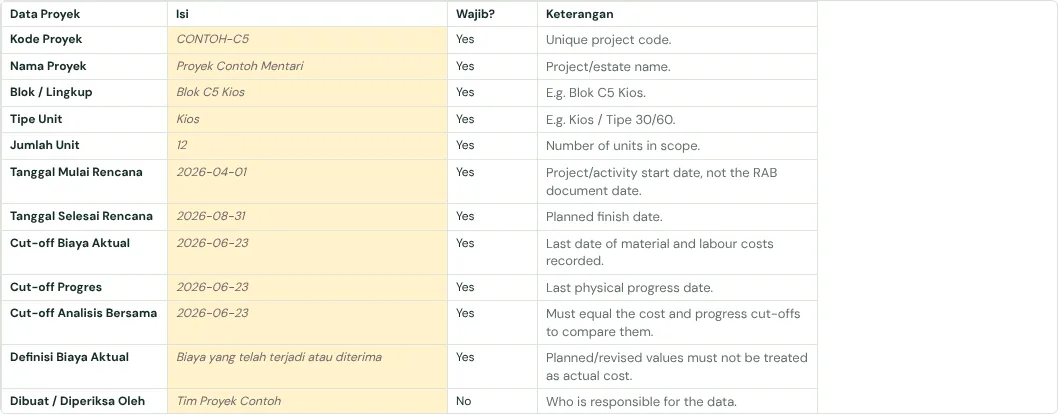
- In the Petunjuk & Info Proyek tab fill three dates: Cut-off Biaya Aktual (last date of material and labour costs recorded), Cut-off Progres (date of the last site measurement) and Cut-off Analisis Bersama (the date cost and progress are compared at).
- The three dates should be the same. If they are not, the report cannot be compared honestly yet.
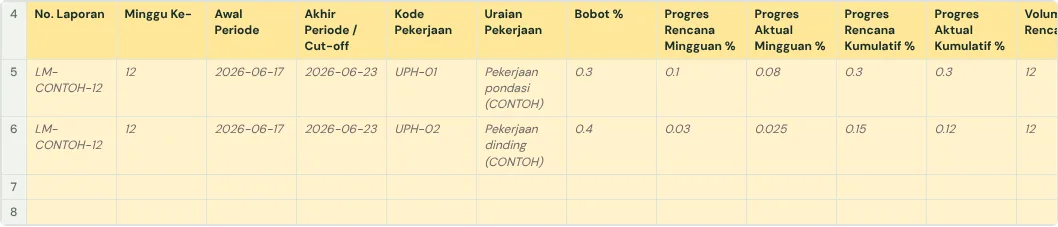
- In the plan-vs-actual, additional work and weekly report tables, fill the Cut-off (or Akhir Periode / Cut-off) column on every row with the same date.
- Enter it as a real date in YYYY-MM-DD form, for example 2026-06-23, not as text like "23 June" or "week 8".
Costs incurred but not yet billed
- Goods received but no bill yet: record them as this period’s cost at PO price × quantity received (backed by the delivery note or goods received note). When the bill arrives, replace that figure with the bill so it is not counted twice.
- Labour-contract or subcontract work done but not yet billed: record it from the measured quantity × contract rate.
- Material on site not yet installed: record it as stock, not as the cost of work, so the project does not look over budget against progress.
- Cash reports (cash flow, bank balance) are different: there the date money actually comes in or goes out is what counts.
How to check the cut-off
- Compare the three dates in Petunjuk & Info Proyek: they must match.
- Look for transactions after the cut-off that were counted. In a helper column enter =IF(C5>$B$10,"AFTER CUT-OFF","") with the transaction date in column C and the cut-off in B10, then filter on it.
- Check the site measurement: the last progress date must not be after the cut-off, and should not be long before it.
- Check the dates are real dates: =ISNUMBER(C5) must be TRUE. Text that looks like a date cannot be calculated.
- Check the next period: anything left out this week must show up in next week’s report, not disappear.
Common mistakes
- Cost and progress on different cut-offs, so the project looks over or under budget when it is not.
- Bills recorded by the date they arrived or were paid, instead of the date goods were received or work was done.
- A cut-off day that moves every week, so one week has 5 days and the next has 9.
- Dates typed as text or in mixed formats (06/07 can mean 6 July or 7 June).
The full guide is in How to build a construction cost report that catches overruns early. It has a free template (Excel or Google Sheets) and a checker that reads your own workbook.
Ready to use the Komander agents on your projects?
When your workbook is complete, apply for a pilot: we help connect your project data to the Finance, Cost and Scheduler agents and review the first reports with you.
Send to melwani@komander.ai. Your workbook check result is included when there is one; the workbook itself is not sent.
Common questions
What is a cut-off date?
A report’s closing date. Everything up to it goes into the report; anything after it goes into the next period.
Why must the cost and progress cut-offs match?
So cost and progress are counted up to the same day. If they differ, the project can look over or under budget when it is not.
Which period does a bill that arrives after the cut-off go into?
By the date the goods were received or the work was done. If the goods arrived before the cut-off, the cost belongs to this period even though the bill came later.
What format should the cut-off date use?
A real date in YYYY-MM-DD form, for example 2026-06-23, so it can be calculated and day and month cannot be swapped.
References
- Jurnal.id: Memahami Akrual (Indonesian): recording costs when incurred, not when paid
- Vergo: Accrue for received-not-invoiced costs on construction projects: steps for goods received but not yet billed
- Trimble Spectrum: Accruing Job Purchase Orders: cost booked when goods are received