A weekly project report answers one question for owners and management: is the project on plan this week, and if not, what is being done about it. A good report is short, uses numbers that can be checked, and always uses the same cut-off day.
What a weekly report contains
| Section | What it holds | Example |
|---|---|---|
| Period | Week number and cut-off date | Week 8, up to 23/06/2026 |
| Progress per work item | Weight, this week and cumulative progress | II.2 Foundations: weight 6%, cumulative 80% |
| Plan and actual | Planned and actual cumulative project progress | 45% planned, 40% actual |
| Deviation | Actual minus planned | Minus 5% |
| Problems | Site issues holding work back | 3 days of rain, late rebar delivery |
| Next steps | What will be done, by whom, by when | 4 more steel fixers from Monday |
What makes a weekly report more useful
- The plan for next week, or a 2 to 4 week look-ahead.
- Workers, equipment, materials delivered, weather and working days lost.
- Safety and quality notes.
- Dated progress photos.
- A deviation status (normal, late or critical) and a sign-off block: prepared, checked, approved.
On government projects the weekly report sums up the daily reports; the contractor writes it and the supervising consultant checks it.
How to put the weekly report together
- Use the same cut-off day every week, for example Saturday afternoon.
- Measure progress on site (opname) for every work item under way.
- Work out cumulative project progress: each item’s progress × its weight, added up.
- Compare it with that week’s planned cumulative progress from the schedule (S-curve) to get the deviation.
- Write problems and next steps for lagging items, with an owner and a date.
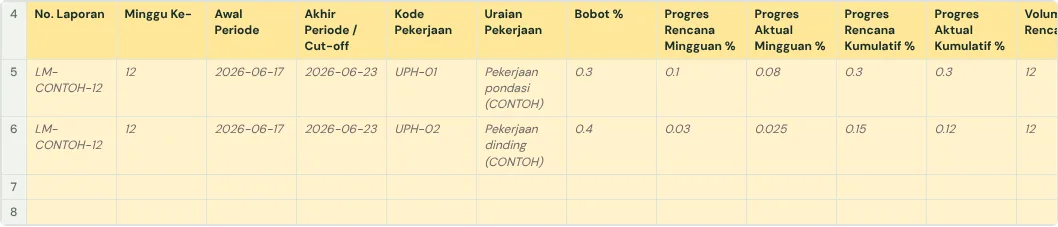
Common mistakes
- One sheet per week, so weeks cannot be compared. One table with a week column works better.
- Progress written as text such as "almost done" instead of a percentage.
- The plan changed every week to follow actual progress, so delay never shows.
- Problems recorded with no next step or owner.
The full guide is in How to create a weekly construction schedule report in Google Sheets. It has a free template (Excel or Google Sheets) and a checker that reads your own workbook.
Ready to use the Komander agents on your projects?
When your workbook is complete, apply for a pilot: we help connect your project data to the Finance, Cost and Scheduler agents and review the first reports with you.
Send to melwani@komander.ai. Your workbook check result is included when there is one; the workbook itself is not sent.
Common questions
What goes into a weekly construction report?
The period and cut-off date, progress per work item, planned and actual cumulative progress, the deviation, site problems and next steps.
Who writes the weekly report?
Usually the site manager, from the site measurement, checked by the supervisor or consultant.
What is the difference between a daily and a weekly report?
A daily report records activities, workers and weather each day. A weekly report sums up measured progress and compares it with the plan.
Can the plan be changed when the project is late?
Keep the original plan so delay stays visible. If the schedule is formally revised, keep it as a new plan and still record the original.
References
- SE Menteri PUPR No. 21 Tahun 2019 (Indonesian): who writes and checks weekly and monthly reports
- Procore: Construction Progress Reports: report sections, look-ahead, sign-off
- Smartsheet: Weekly Status Report Templates: example layouts